



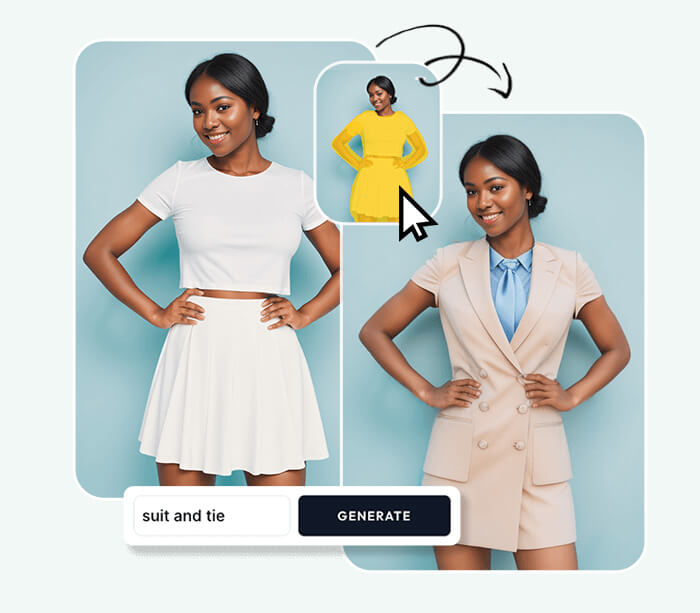
High-quality visuals are essential in today’s digital world, whether for social media, marketing campaigns, educational content, or personal projects. Blurry, poorly lit, or low-resolution images can reduce engagement and affect the overall impact of content. To address these challenges, AI-powered tools have emerged as game-changers in image editing. An AI Image Editor leverages artificial intelligence to enhance images efficiently while maintaining professional quality.
These platforms use advanced algorithms to analyze and improve various aspects of an image automatically. In the middle of this technological advancement, AI Image Editor tools offer a wide range of image enhancement techniques, from color correction and brightness adjustment to background removal and resolution improvement. These features allow creators to save time, maintain consistency, and focus on the creative aspects of their projects rather than technical adjustments.
Color Correction and Adjustment
One of the most common image enhancement techniques is color correction. Images taken in poor lighting conditions or with incorrect camera settings often have unnatural hues or uneven tones. AI Image Editors automatically analyze the color balance in an image and make adjustments to improve visual appeal. Users can also fine-tune saturation, warmth, and contrast to match specific moods or brand guidelines. Color correction not only improves aesthetics but also ensures that images convey the intended message effectively.
Brightness and Contrast Enhancement
Proper brightness and contrast levels are critical for image clarity. Low brightness can make details hard to see, while low contrast can make images appear flat. AI Image Editors automatically evaluate the overall lighting and tonal range of an image, making intelligent adjustments that enhance clarity and detail. Users can further refine these settings to highlight focal points, improve visual storytelling, or create dramatic effects.
Sharpening and Detail Enhancement
Blurry or soft images can negatively impact the perception of quality. AI Image Editors include sharpening and detail enhancement tools that intelligently improve edges and textures. These features make subjects in the image more defined while maintaining natural appearance. This technique is especially useful for product photography, social media content, and digital marketing, where crisp visuals attract more attention and engagement.
Noise Reduction
Images captured in low light or with high ISO settings often contain unwanted noise or grain. AI Image Editors use sophisticated algorithms to reduce noise while preserving essential details. This produces smoother, cleaner visuals that appear more professional. Noise reduction is particularly valuable for photographers, content creators, and marketers who rely on high-quality imagery for professional projects.
Background Editing and Replacement
Backgrounds play a significant role in overall image quality and visual focus. AI Image Editors provide background editing and replacement tools that allow users to isolate subjects, blur distracting elements, or completely change the backdrop. This technique is especially useful for product photography, promotional graphics, and creative content where the main subject needs to stand out clearly.
Resolution and Upscaling
Low-resolution images can appear pixelated, especially when enlarged for print or high-definition digital displays. AI Image Editors offer resolution enhancement and upscaling capabilities, increasing the size of images without losing clarity. AI algorithms intelligently predict and fill missing details, ensuring that visuals remain sharp and professional even at larger dimensions.
Object-Specific Enhancements
In some cases, only certain elements of an image need improvement. AI Image Editors allow object-specific enhancements, enabling users to adjust brightness, color, or detail for individual elements without affecting the rest of the image. This selective editing is particularly useful for product photography, advertisements, and creative projects where focus and clarity are critical.
Batch Processing for Efficiency
Working with multiple images can be time-consuming if each one requires individual edits. AI Image Editors include batch processing capabilities that allow enhancements to be applied to several images at once. This ensures consistency across projects, saves time, and simplifies workflows for social media campaigns, marketing materials, and e-commerce catalogs.
Creative Filters and Style Adjustments
Beyond technical enhancements, AI Image Editors also offer creative filters and style adjustments. Users can apply artistic effects such as watercolor, sketch, or digital painting to transform standard images into visually striking designs. These creative tools allow experimentation while maintaining image quality, providing flexibility for marketing campaigns, branding projects, and personal artwork.
Conclusion
AI Image Editors provide a comprehensive set of techniques for enhancing images efficiently and professionally. From color correction, brightness and contrast adjustment, sharpening, and noise reduction to background editing, resolution upscaling, object-specific enhancements, batch processing, and creative filters, these tools simplify complex editing tasks. By leveraging AI technology, creators can produce high-quality visuals faster, maintain consistency across projects, and focus on creative exploration, making AI Image Editors indispensable for modern digital content production.